![fieldconnect-logo-1000x118-light-bg.png]](https://knowledge.fieldconnect.com/hs-fs/hubfs/fieldconnect-logo-1000x118-light-bg.png?height=25&name=fieldconnect-logo-1000x118-light-bg.png)
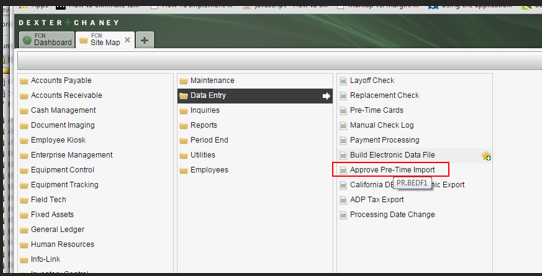
Unapplied time entries are added to DC using the Pre-Timecard web service. The entries sent from the web service do not go directly into the Pre-Timecard screen. They are entered into what is called the “Pre-Timecard Import Errors”.
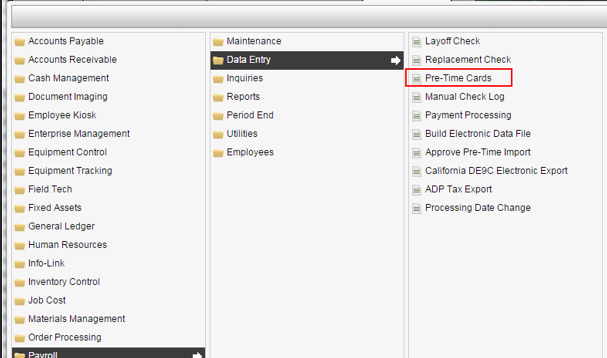
To get to the Pre-Timecard form in the Spectrum UI: Payroll > Data Entry -> Pre-Time
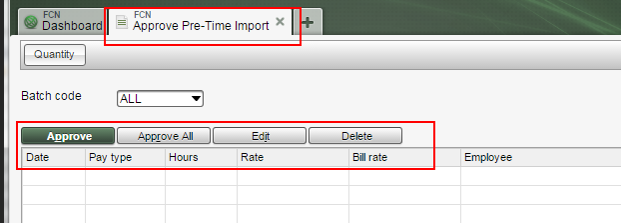
Approval screen:
Select a batch code and click the Tab key:
Once accepted the entries can be found in the Pre-timecard screen for the employee:
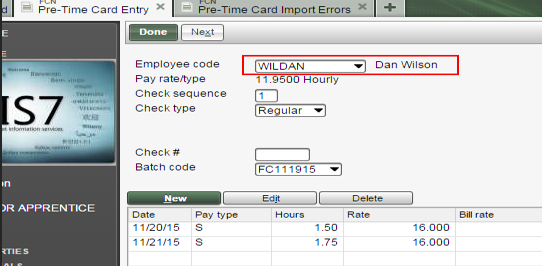
Note that batch codes use in FA are formatted using the date of the start of the payroll period: FCMMddyy
FC settings and filters:
- Filter: UnappliedPayTypes – pay types available to the tech
- Setting: UsingUnappliedTime – page visibility
- UnappliedPRCostDept – payroll cost department (selection list of departments that are non-direct cost)